

Go-live is when an AI workflow starts to change, not when it stops. Models drift, inputs shift, costs creep, and the people who built it move on. Here’s how to run your first workflow so it stays right, decide in advance when to scale it or stop it, and make the second workflow faster than the first.
Series – this is part 4 of 4 in Pilot to Production, our practical guide to getting an AI workflow live and keeping it there. Part 1: The AI Pilot That Reaches Production Is the One Nobody Wants to Demo. Part 2: The Pilot Worked. Now Build It Like Someone Will Rely on It. Part 3: Prove Your AI Workflow Works Before You Switch It On.
The Bank of England and FCA’s 2026 survey of AI in UK financial services, which we’ve leaned on throughout this series, found that 94% of the firms answering had at least one AI system in production. It’s blunt about where their attention goes. “Pre-deployment review, human approval and vendor due diligence were each reported by more than 90% of respondents. By contrast, ongoing monitoring, leakage testing and periodic review or recertification were each reported by around half of respondents.”
The detail makes the point sharper. 52% monitored model drift, bias, or data drift. 39% monitored the impact on customers. 68% kept a central inventory of their AI systems, and fewer than half had incident-management and response playbooks. Outside the regulators’ survey, Evident’s AI Index for Banks found in October that “only 12% of use cases report impact against operational KPIs, and barely 1% disclose concrete financial returns.”
Lloyds shows what the other half of the job looks like. Reporting on the fraud platform we opened part 1 with, it said “components developed for the platform are already being reused across other fraud journeys, helping teams move faster as the capability expands”. That’s the second workflow arriving faster because the first one left something behind.
Most firms check AI carefully on the way in. Only about half keep checking once it’s live.
Name an Owner, Not a Team
Every live AI workflow needs one named person who answers for its results, and a run team that can diagnose it, not just keep its servers up. The person who signed it off in part 3 is usually the right owner. The team that built it usually isn’t the right run team, because builders move on to the next project and take their knowledge with them.
Write the handover down before they go: what the workflow does, what it’s allowed to do alone, what normal looks like on each measure, and who to call when it isn’t.
If the only people who can explain the workflow are the ones who built it, nobody’s running it.
Watch Quality, Not Just Uptime
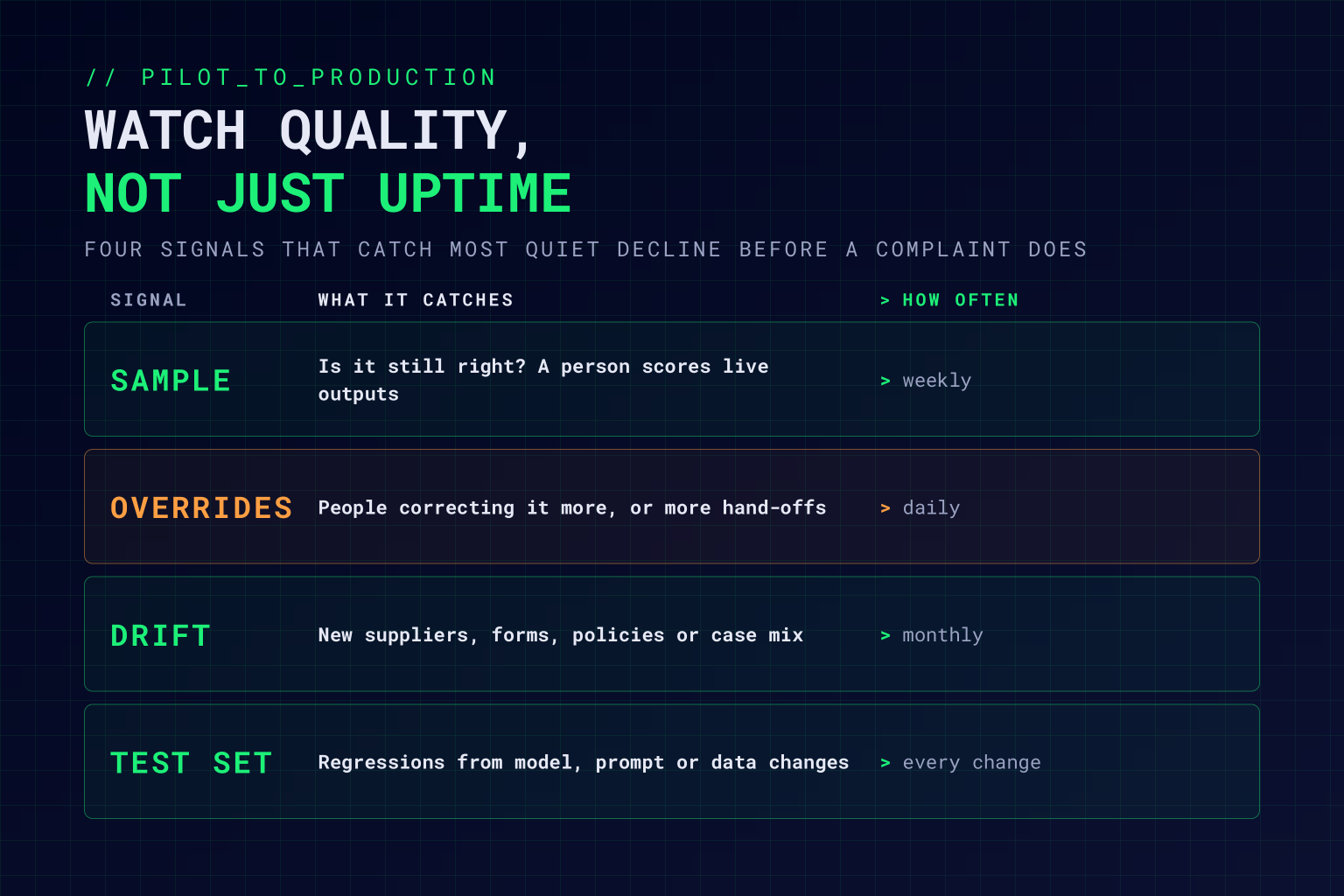
AI workflows rarely fail loudly. They keep answering, a little more wrongly each month, while every dashboard stays green. We’ve written about how AI quietly rots, and why the monitoring evidence you’ll need can’t be backdated. In practice, four signals catch most of it:
A weekly sample against the quality bar. Have someone who does the work score a random sample of live outputs. It’s slow and unglamorous, and it’s the only measure that tells you directly whether the workflow is still right.
Override and escalation rates. When people start correcting the workflow more often, or it hands over more cases, something has changed. These move weeks before a complaint arrives.
Drift in the inputs. New suppliers, a new form, a policy change, a different mix of cases. The workflow was tested on last quarter’s work, and it’s now doing this quarter’s.
The test set, re-run on every change. Part 3’s evaluation set doesn’t retire at go-live. Re-run it whenever the model, prompt, or source data changes, including changes your provider makes for you.
Keep the Cost per Outcome Running
The cost per outcome you set out in part 1 becomes a monthly number once the workflow’s live. Count everything: tokens, platform, and the people time spent reviewing and correcting. Divide by the outcomes that met the quality bar, as in our cost-per-outcome model. Report the spread as well as the average, because a few runaway cases can hide behind a healthy mean.
Few organisations do this yet. KPMG’s third-quarter AI Pulse survey of 2,131 senior leaders found that 59% monitor AI costs in operation, but only 12% consistently assess AI value against cost across the organisation. Put the number in front of the owner, not just finance. When cost per outcome rises while quality holds, look for loops, retries, and oversized models first.
Decide Now When to Scale, Fix, or Stop
Agree the rule before the first monthly review, while nobody’s emotionally invested in the answer.
| Decision | When | What happens next |
|---|---|---|
| Scale | Meets the quality bar for two monthly reviews running, cost per outcome below the old process, and the owner wants more | Widen the slice, add volume, or extend it to the next team |
| Fix | Misses on one measure, or override rates are climbing | Hold the scope, find the cause, re-run the test set, and review again in a month |
| Stop | Misses the quality bar two reviews running, any zero-tolerance error repeats, or cost per outcome stays above the old process | Switch off, fall back to the manual process, and keep what you learned |
Stopping a workflow that doesn’t earn its keep is a result. Letting it run because nobody wants to say so is the failure.
Make the Second Workflow Faster Than the First
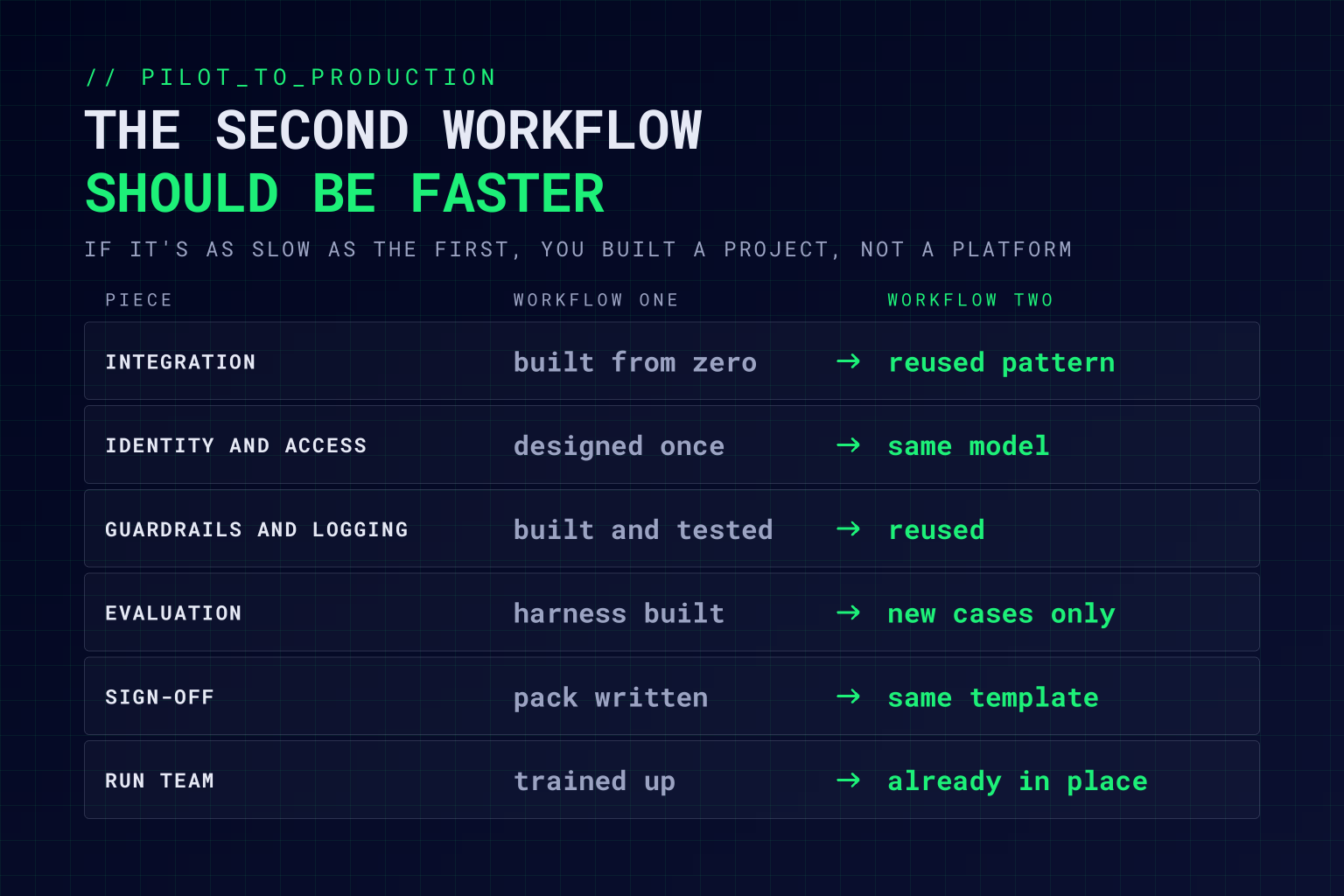
The first workflow pays for things you’ll never have to build again: the integration patterns, the identity and access model, the guardrails, the logging, the evaluation harness, the sign-off pack, and a run team that knows what it’s doing. The second workflow should reuse all of them. If it takes as long as the first, the first one didn’t leave a platform behind. It left a project. Banks are already building this way: Evident counts at least 14 banks running a central AI platform that “lets banks scale faster by reusing code and guardrails and get a better read on usage, performance and cost.”
So go back to the scorecard in part 1 and run it again. This time the scores for data, approval, and integration should be higher, because the hard decisions have already been made once. Somewhere around the third or fourth workflow, the customer-facing candidate you parked at the start starts to look realistic.
Scaling is a leadership question as much as an engineering one. If the board’s ambition is ahead of what the organisation can run, or the other way round, our AI leadership readiness work shows where the gap sits.
Q&A: Running and Scaling AI in Production
Who should own an AI system in production?
One named business owner who answers for its results, usually the person who signed it off, supported by a run team that can diagnose the workflow as well as keep it running. The team that built it usually moves on, so the handover needs writing down.
How do you monitor an AI workflow after go-live?
Score a weekly sample of live outputs against the quality bar, track override and escalation rates, watch for drift in the inputs, and re-run the evaluation set whenever the model, prompt, or source data changes, including changes made by your provider.
When should you scale an AI use case?
When it has met its quality bar for two monthly reviews running, its cost per outcome is below the process it replaced, and its owner wants more. Agree that rule before the first review so the decision isn’t made on enthusiasm.
When should you stop an AI workflow?
When it misses its quality bar two reviews running, a zero-tolerance error repeats, or its cost per outcome stays above the old process. Switch it off, fall back to the manual process, and keep the lessons for the next workflow.
How do you make the second AI use case faster than the first?
Reuse what the first one built: integration patterns, the identity and access model, guardrails, logging, the evaluation harness, the sign-off pack, and the run team. Then re-score your shortlist, because those reusable pieces raise the scores of candidates that looked too hard at the start.
Working Through This With Vertex Agility
As an AI-native transformation consultancy, we help organisations keep AI right once it’s live and scale what works. Our Managed ModelOps service runs AI systems on an SLA, with a named owner and evidence your risk function can use, whether we built them or you did. Our Onboarding & Assurance Audit maps what’s already running and deploys the monitoring it needs, and our AI Use Case Factory turns the first workflow’s platform into the second, third, and fourth.
If you’ve already got AI in production, our free AI Health Scan checks one model for the quiet decline described above. If you’re deciding how far to scale, our free AI Leadership Readiness Scorecard shows whether your leadership and your organisation are ready for the same pace.