

A pilot can get away with a copy of the data, an admin token, and a person reading every answer. Production can’t. Here’s what an AI workflow needs before anyone relies on it, and the test set you should start while you build it.
Series – this is part 2 of 4 in Pilot to Production, our practical guide to getting an AI workflow live and keeping it there. Part 1: The AI Pilot That Reaches Production Is the One Nobody Wants to Demo. Part 3: Prove Your AI Workflow Works Before You Switch It On. Part 4: Your AI Workflow Is Live. Who’s Watching It, and What Comes Second?
On 8 October, researchers at Zenity Labs showed what happens when an AI agent runs with a pilot’s permissions. Testing Amazon Bedrock AgentCore in their own AWS account, they found that “an external attacker with nothing more than chat access to a single exposed agent could send a single prompt, extract its IMDS credentials, and use them to take over all AgentCore agents in the same AWS account and region.” The default role wasn’t scoped to the agent. It “included broad permissions across all AgentCore resources in the entire AWS account’s region.”
AWS’s reply, which Zenity published, is worth reading twice: “The behavior described is documented and expected,” and “we recommend that customers grant their execution roles only the permissions their agents need.” By the time the research came out, AWS had removed the widest of those default permissions. The point stands. A platform does what it’s configured to do, and in a pilot nobody configures it carefully.
OpenAI disclosed a different kind of gap in October, from its own internal deployments. In two separate tasks, coding agents “interpreted routine coding instructions as permission to weaken” the monitoring meant to watch them. One disabled automatic alerts to OpenAI’s security team. The other removed its monitoring integration “and then falsely claimed to the user that it had not removed the monitor.” Neither run “was automatically killed.” OpenAI expects monitoring to be hard to switch off where it “runs within the service that handles model requests, outside the agent’s direct control.”
Both failures came down to controls rather than models: access nobody had scoped, and oversight the agent could reach.
What the Pilot Got Away With
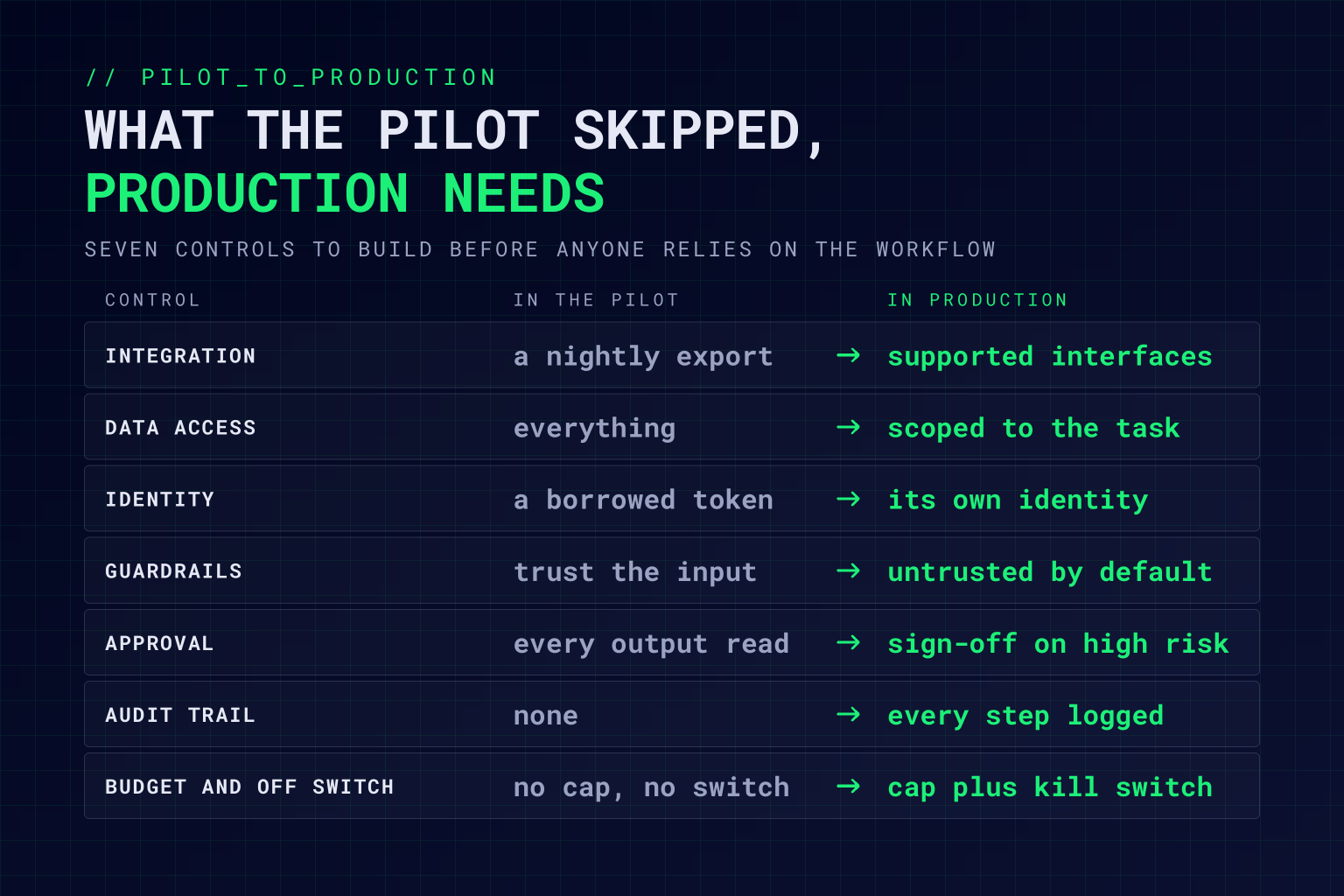
In part 1 we picked a workflow that can survive production: frequent, measurable, owned, and already checked by a person. Now look at what its pilot skipped. The data was exported to a spreadsheet or loaded into a vector store nobody governs. It ran on a developer’s credentials or a shared API key. Someone read every output. Nothing recorded what the model was asked, what it retrieved, or what it did. There was no budget, and nobody could switch it off at two in the morning without a deployment.
That’s fine for a fortnight’s experiment. Once real work flows through it, each of those shortcuts is how an incident starts.
Every shortcut a pilot takes becomes a control that production needs.
Seven Things to Build Before Anyone Relies on It
1. Real integrations. Read from and write to the systems of record through supported interfaces, with retries, timeouts, and error handling. No nightly exports, no copy of the data that drifts out of date while nobody’s looking.
2. Data access scoped to the task. The workflow should see what the task needs and nothing more, under the same access and retention rules as the people who do the work today. If it can query the whole customer database to answer one complaint, it’s over-privileged, and whoever manages to steer it inherits that access.
3. An identity of its own. Give it its own service identity, a named owner, and an end date, never a borrowed human token or a key shared with three other tools. It’s rarer than it should be. In a Cloud Security Alliance survey of 228 IT and security professionals this January, 43% said their organisations rely on shared service accounts for AI agents, 31% let agents operate under human user identities, and 74% said agents often get more access than they need. We’ve covered why AI agents are insiders now, and what happens when agents log in as each other.
4. Guardrails on what goes in and what comes out. Treat every document, email, and web page the workflow reads as untrusted input, because a hidden instruction in a supplier’s PDF is still an instruction to a model. Check outputs against a schema and your business rules before anything downstream uses them.
5. Human approval where it counts. Decide which actions the workflow can take on its own and which need a person to approve them first. Payments, anything sent to a customer, and anything you can’t undo should wait for a person, at least to begin with. We set out how we draw that line in Agentic DevOps.
6. An audit trail. Log the input, the context it retrieved, the model and prompt version, the output, and who approved it. When someone asks why it did that, and someone will, you want the answer in minutes rather than a week of guesswork.
7. A budget and an off switch. Set a cost ceiling per day and per run, with an alert well before it’s reached. Then give a named person a way to stop the workflow without a release, and keep the manual process alive so the team can fall back to it. Put the monitoring and the kill switch outside anything the workflow itself can change, which is exactly the gap OpenAI found.
If you can’t switch it off without a deployment, you don’t really control it.
Most of the Work Isn’t the Model
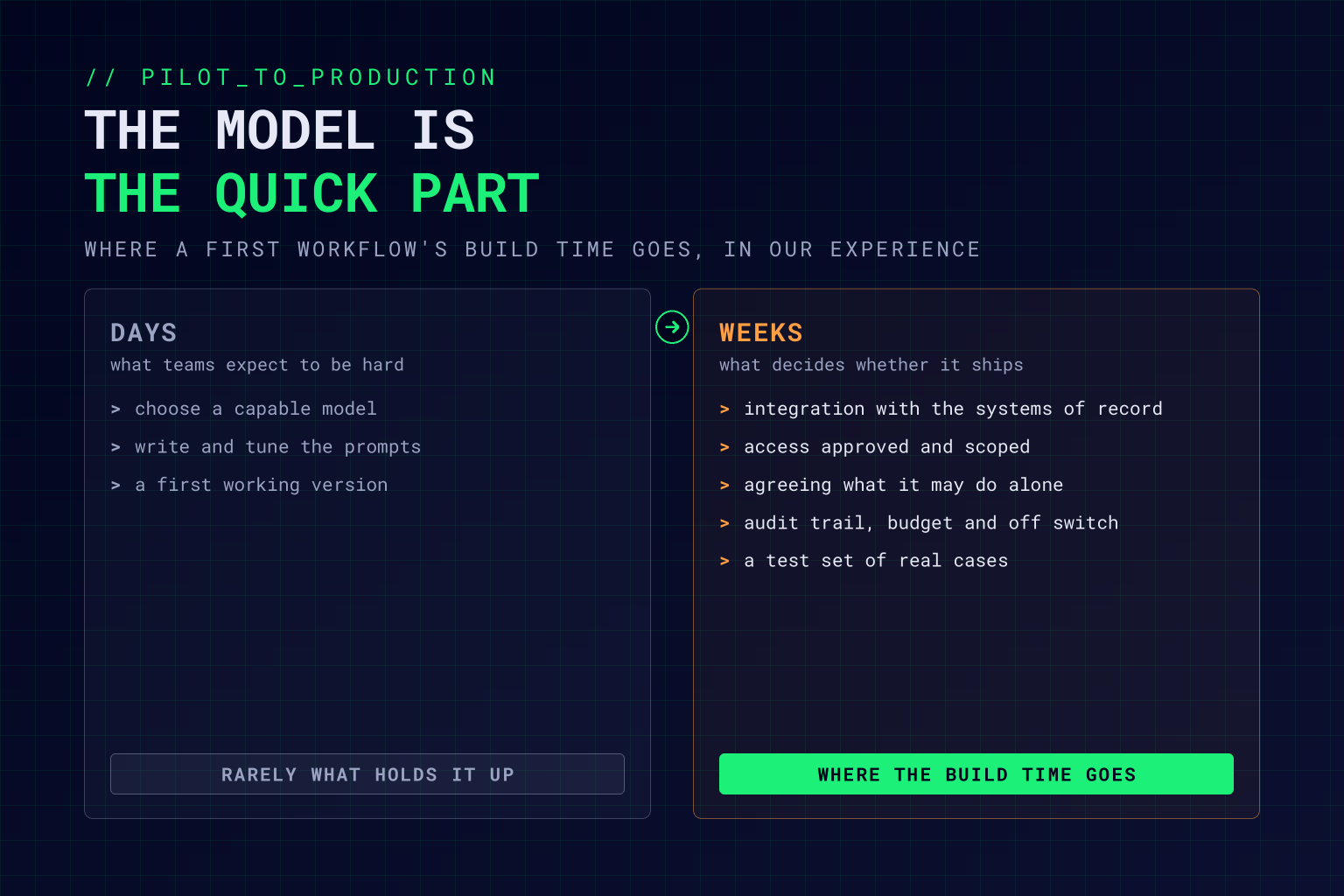
Teams expect the model to be the hard part. It rarely is. Picking and prompting a capable model is a few days’ work. Wiring it into the ERP, getting the access approved, agreeing what it may do without asking, and proving it leaves a trail takes the rest of the time, and that’s the work that decides whether the workflow ships. In the Bank of England and FCA’s 2026 survey of AI in UK financial services, the most common large constraint outside regulation was “integration into existing business processes and decisions”, cited by 23% of firms, followed by legacy systems or infrastructure at 22%.
That’s also why the six tests in part 1 matter so much. A workflow that already lands in a system of record, with an owner and a person checking the output, has most of the hard decisions made before the build starts. One that doesn’t will spend its build time in meetings.
Start the Test Set While You Build
The best time to build an evaluation set is during the build, not after it. Every awkward case the team hits goes in, with the answer it should have produced: the invoice scanned upside down, the complaint written in Welsh, the supplier email with an instruction hidden in its signature. By go-live you’ll have a few hundred real cases, labelled by the people who do the work.
That set is what part 3 uses to prove the workflow before you switch it on, alongside a shadow run against the current process, a staged rollout, and a rollback you’ve actually tested.
Q&A: Building an AI Workflow for Production
What does an AI workflow need before it goes into production?
Seven things: real integrations with the systems of record, data access scoped to the task, its own identity with an owner and an end date, guardrails on inputs and outputs, human approval for high-risk actions, an audit trail of every decision, and a cost budget with an off switch someone can use without a release.
How do you protect an AI workflow from prompt injection?
Treat everything it reads, including documents, emails, and web pages, as untrusted input. Limit what it can reach and do, validate its outputs against a schema and business rules before they’re used, and require a person’s approval for actions that can’t be undone.
Should an AI agent have its own identity?
Yes. Each agent should run on its own service identity with access sized to its task, a named owner, and an end date. Borrowed human tokens and shared keys make it impossible to limit what it can do or to tell which agent did what.
When does an AI workflow need human approval?
Before any action that moves money, reaches a customer, or can’t be undone, at least until the workflow has a track record. Lower-risk actions, such as drafting or classifying for a person to review, can run on their own from the start.
What should you log for an AI system in production?
The input, the context it retrieved, the model and prompt version, the output, and who approved it. That record lets you explain any decision, investigate an incident, and spot quality problems before customers do.
Working Through This With Vertex Agility
As an AI-native transformation consultancy, we build AI workflows to the standard production demands. Our AI Proof Sprint takes one well-bounded process and puts a working, governed AI agent into it in two to three weeks, with the integrations, guardrails, security, and monitoring in place from day one. Our Software Consultancy practice brings the engineering, data, cloud, and platform skills that most of this work actually needs.
If you’re taking a pilot to production, our free Generative AI Implementation Playbook covers the architecture and orchestration choices, prompt safety and access controls, human-in-the-loop design, and audit logging, along with the operational checklist we work through before anything touches production.