

Last week’s Microsoft 365 outage took Outlook, Teams, and Copilot down for the best part of a day across more than 70 countries. Microsoft says it wasn’t a cyberattack and it wasn’t AI. It was three ordinary conditions arriving at once. For most organisations, the more useful lesson is closer to home: the plan for losing Microsoft 365 usually lives inside Microsoft 365.
From late afternoon on Thursday 12 November, UK time, people across Europe, the Americas, and Asia-Pacific found they couldn’t reach their mailboxes. Within an hour, Downdetector was logging reports from 74 countries, and Reuters later put the worldwide total at more than 7.4 million reports, peaking at nearly 20,000 a minute. Microsoft’s advisory listed Exchange Online, Teams, SharePoint Online, Microsoft 365 Copilot, and Defender XDR among the affected services, and administrators lost their Intune dashboards too.
In the UK, NHS services turned to alternative measures, including paper records, and the Metropolitan Police couldn’t take some crime reports online, though it could still answer calls. Schools, courts, and councils were disrupted as well. Microsoft reported broad recovery on Friday afternoon, finished restoring the remaining customers over the weekend, and said it had found no sign of malicious activity.
Microsoft will fix Microsoft. What you own is how your organisation works on the day it’s gone.
Three Ordinary Conditions, One Global Outage
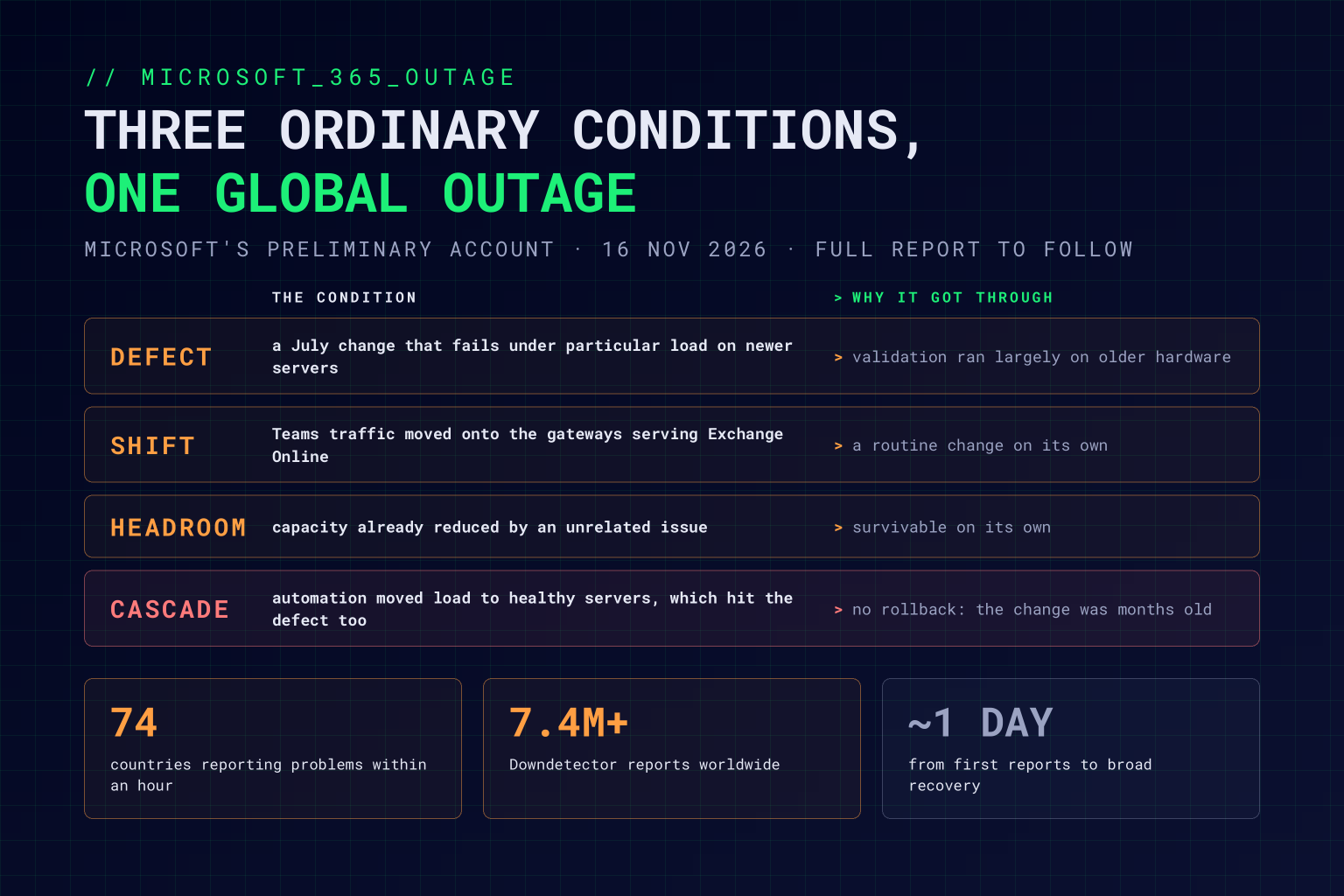
Microsoft’s first explanation, on Friday, was that the incident “was introduced by an issue during an earlier network capacity upgrade that surfaced following a recent network change”, and that it was “a technical issue not related to cyber or AI / agents”. On Monday it set out a fuller preliminary account. It describes three conditions in the networking gateway servers that sit in front of Microsoft 365, none of them enough to cause an outage on its own.
A dormant defect. A change deployed in July carried a defect that only showed under particular load, on newer servers with more processor cores. Microsoft’s validation environments ran largely on older hardware, so testing didn’t catch it, and it sat in production for months.
A traffic shift. Teams traffic had recently been moved onto the same gateways that serve Exchange Online, adding load in exactly the place the defect lived.
Less headroom. An unrelated issue had already reduced the capacity available.
Together, they pushed servers into the conditions the defect needed, and the servers stopped responding. Automated traffic management did what it was built to do and moved the load onto healthy servers, which then hit the same defect. Rolling back wasn’t an option, because the faulty change was months old. Engineers had to build a targeted fix, take groups of servers out to apply it, and bring capacity back gradually, and some restored servers failed again as traffic returned.
Microsoft has paused deployments and says a full post-incident report will follow, so the detail may still change. The shape is a familiar one, though. In January, a North American Microsoft 365 outage of almost ten hours was put down to heavy load arriving while capacity was reduced for maintenance. Each condition was survivable alone. The outage lived in the combination, and that’s the part most testing never reaches.
Your Systems Have the Same Shape
You can’t fix Microsoft’s gateways, but the systems you build and run can fail the same way. Serious outages are rarely one big mistake. More often they’re a latent fault, a routine change, and a little less headroom than usual, each of which passed its own review. As we argued after June’s AWS outage, resilience is an architecture decision. Four questions are worth asking of your own estate.
Does your testing look like production? Microsoft’s defect hid because validation ran on different hardware. If your test environments use different instance types, smaller data volumes, or lighter traffic than production, you’re testing a different system. Load-test on production-like infrastructure, and test changes in combination, not only one at a time.
Does your failover know when to stop? Moving load to healthy servers is the right response to a dead server and the wrong one to a fault that load itself triggers. Circuit breakers, load shedding, and limits on how much traffic automation can move at once keep a local failure local.
Can you roll forward when you can’t roll back? A change that’s been live for months can’t simply be reverted. Small, frequent releases, feature flags that switch behaviour off without a redeploy, and a rehearsed route for shipping an emergency fix are what get you out.
Who sees every change at once? A traffic move, a capacity reduction, and a months-old release can each be someone’s reasonable decision. Someone needs to see them side by side, along with how much headroom maintenance leaves, before they meet in production.
Resilience isn’t proved by each change passing its tests. It’s proved by what happens when they meet.
Is Your Plan B Inside Microsoft 365?
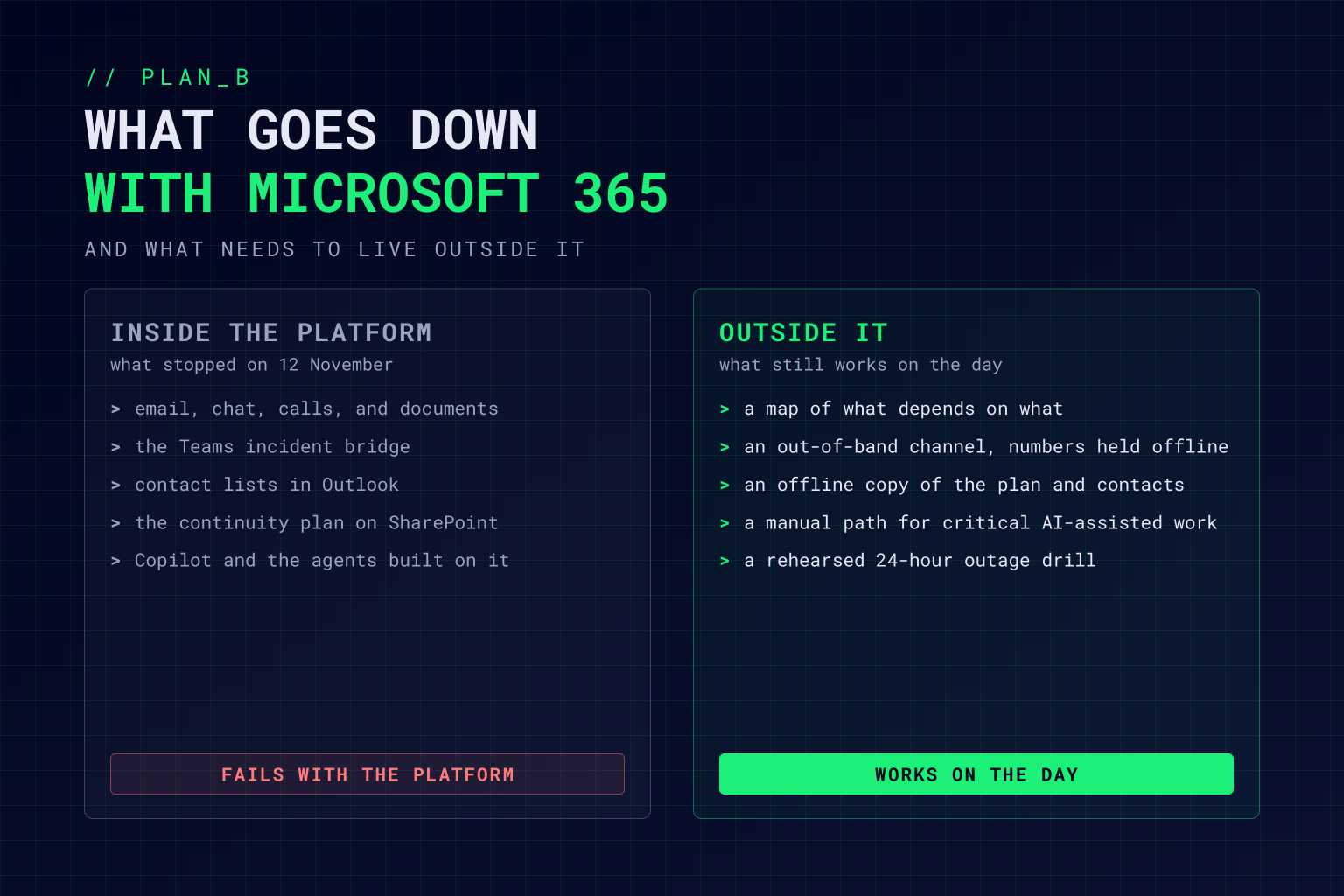
Most organisations use Microsoft 365 rather than run it, so for them the bigger question is what stopped working last Thursday. Email, chat, calls, documents, and meeting notes all run on the one platform. In many organisations, so do the incident bridge, the list of people to call, and the continuity plan itself, saved in a SharePoint folder no one can open.
The NHS could turn to paper because it has long-standing measures for working without its systems. Many businesses don’t. And this outage hit a newer dependency, too. Copilot was on Microsoft’s list of affected services, so every process rebuilt around an AI assistant or agent inside Microsoft 365 stopped with it. Microsoft was clear that AI didn’t cause the outage. It didn’t need to. The more of your work runs through AI on one platform, the more a platform outage becomes an operational one.
The answer isn’t to leave Microsoft 365. Every platform has bad days, and we’ve made the same point about AI providers: model risk isn’t a vendor problem, and neither is platform risk. The answer is to plan for a day without it.
Map what really depends on it. Not just email: approvals, alerts, automated workflows, customer communications, Copilot, and any agents built on the platform. Mark the ones that can’t wait a day.
Keep a channel that doesn’t share the dependency. Give the incident team an out-of-band way to talk, with phone numbers and the escalation list held outside Microsoft 365, and test it before you need it.
Keep the plan where you can reach it. Hold an offline copy of the continuity plan, critical contacts, and the decisions people are allowed to make by phone.
Give every critical AI-assisted process a manual path. Decide who does the work when the assistant isn’t there, and keep the skills to do it. Where a process really can’t stop, design it so the model or platform underneath can be swapped.
Rehearse it. Run a tabletop exercise that starts with “Microsoft 365 is down for 24 hours, from now”. Most of the gaps show up in the first hour.
We made the case after last month’s PHP2Shell shutdowns that going offline should be part of the plan. Losing a platform you don’t run belongs in the same plan. If your plan B runs on the platform that’s down, it isn’t a plan B.
Q&A: The Microsoft 365 Outage and Your Business
What caused the Microsoft 365 outage in November 2026?
Microsoft’s preliminary explanation is that three conditions combined in the networking gateway servers in front of Microsoft 365: a defect in a change deployed in July that only showed under particular load on newer hardware, a recent move of Teams traffic onto the gateways serving Exchange Online, and capacity already reduced by an unrelated issue. Microsoft says it wasn’t a cyberattack or related to AI, and a full post-incident report will follow.
Which Microsoft services were affected?
Microsoft’s advisory listed Exchange Online, Microsoft Teams, SharePoint Online, Microsoft 365 Copilot, and Defender XDR, with Outlook hit hardest. The disruption began on Thursday 12 November, Microsoft reported broad recovery on Friday afternoon, and the remaining customers were restored over the weekend.
Why couldn’t Microsoft just roll back the change?
The defect was introduced in July, months before it caused the outage, so there was no recent change to reverse. Engineers had to build a targeted fix, take groups of servers offline to apply it, and bring capacity back gradually.
How should a business prepare for a Microsoft 365 outage?
Map which processes depend on Microsoft 365, including approvals, alerts, automated workflows, and AI assistants. Keep an out-of-band communication channel and an offline copy of the continuity plan and critical contacts, give critical AI-assisted processes a manual fallback, and rehearse a 24-hour outage as a tabletop exercise.
What can engineering teams learn from the outage?
Test on production-like infrastructure and test changes in combination, not only one at a time. Limit how much load failover can move, so a fault that load triggers can’t spread, be able to roll forward when rollback isn’t possible, and give someone a view of every change and maintenance window in flight at once.
Working Through This With Vertex Agility
As an AI-native transformation consultancy, we help organisations keep working when a platform underneath them doesn’t. Our Business Continuity & Disaster Recovery programme starts with a business impact analysis that maps what really depends on what, then builds the plan, the communication protocols, and the exercises that keep it current. The Cloud Resilience & Compliance Accelerator tests the systems you run against real-world failures, and Managed ModelOps gives the AI in your critical processes a named owner, monitoring, and evidence your risk function can use.
If you’d like to know how your organisation would have handled last Thursday, our free Downtime Defence Audit scores your disaster recovery, resilience, backups, incident response, and monitoring in about three minutes. It’ll show you where your plan B still depends on plan A.